
Behavioral Segmentation for Statsig Experiments with Snowplow Signals
Behavioral segmentation describes the process of grouping customer segments by what they actually do (pages they view, products they consider, purchases they make, sessions they spend in-app) rather than who they are demographically.
In experimentation, we see behavioral segmentation as the difference between testing one variant on everyone and testing the right variant on the right segment. Done well, it lifts conversion rates, sharpens the personalized experience your product team is trying to deliver, and makes the results of any experiment far easier to read.
The catch is that most experimentation platforms tend not to store the behavioral data you need to do this well. So, two options usually surface, and both are painful.
Option 1: re-instrument inside the experimentation platform
The first option is to re-implement event tracking using Statsig's own SDK. Your behavioral events already flow through your analytics pipeline; this approach asks you to send the same events through Statsig as well, purely so you can build segments from them inside the Statsig console. The cost is double the maintenance, divergence risk between two event streams, and ongoing work to keep both in sync as your product evolves.
Option 2: build your own attribute pipeline
Or, you can pull the behavioral data from your warehouse, transform it into user-level attributes, sync it into Statsig, and keep that pipeline alive. ETL, scheduling, schema changes, integration failures: a targeting improvement turns into a quarter-long infrastructure project before anyone runs an experiment.
A different approach: the customer context layer
Snowplow Signals solves this differently. Signals delivers real-time customer context to your applications: it sits on your existing behavioral data and serves computed user attributes through an API at decision time. It doesn't require re-instrumentation or bespoke pipelines. Statsig consumes those attributes to decide who enters an experiment, which variant they see, and how you analyze the results.
The same Signals attributes powering targeting here are the foundation customers use further along the curve: in-product personalization today, customer-facing AI agents next. Experimentation is one of the lowest-friction first uses of behavioral segmentation on top of the customer context layer.
The rest of this post walks through the integration in three steps: passing Signals attributes into the StatsigUser object, building Feature Gates that target on them, and reading experiment parameters in your code. We'll also cover why passing attributes you don't currently target on still pays off when it's time to analyze the results.
Prerequisites
- A Signals account with computed attributes configured for your users (e.g.
ltv_band,last_product_category). If you haven't created Signals attributes before, follow one of our tutorials or the documentation. - A Statsig account with a project set up. If you haven't created one yet, follow the official Statsig documentation.
- Access to your application's backend or frontend where the Statsig and Signals SDKs are initialized.
The example attributes used in this walkthrough:
These attributes are fetched together in a single API call via a Signals Service, even though they come from different attribute groups.
How Statsig uses attributes
The StatsigUser object is the sole input you provide to SDKs to target gates and assign users to experiments. To segment on an attribute, add it to the user object.
Unlike platforms that require you to pre-register every attribute in a console, Statsig accepts arbitrary key-value pairs in the custom field. Every Signals computed attribute you pass becomes immediately available for targeting and segmentation. No setup step in the Statsig console required.
Step 1: pass Signals attributes in the StatsigUser object
When your application initializes Statsig or evaluates an experiment, fetch the user's current attributes from Signals and include them in the custom field of the StatsigUser object.
// On your backend using one of our SDKs
await signals.getServiceAttributes({
  attribute_key: "domain_userid",
  identifier: "e24d3aaa-160e-40de-a569-1580fb3ad6d7",
  name: "statsig_attributes",
})

// On the frontend fetch the user's real-time attributes from the endpoint
const response = await fetch('/api/signal/attributes');
const signals = await response.json();

// Initialize Statsig with Signals attributes in the custom field
const client = new StatsigClient('client-sdk-key', {
  userID: userId,
  custom: {
    ltv: signals.ltv_band,
    last_product_category: signals.last_product_category,
  },
});

await client.initializeAsync();
Tip: Statsig recommends providing as much information as practical, since every additional field can enrich your analyses and expand targeting possibilities. Pass all relevant Signals attributes, not only the ones you plan to target right now.
Step 2: target experiments using Signals attributes
With the Signals attributes available in the custom field, you can use them as targeting conditions on your experiments through Feature Gates.
A Feature Gate encodes your audience definition as a set of rules and can be referenced from one or more experiments. This is the recommended approach. It keeps your targeting logic separate from any individual experiment, making it reusable and easier to manage.
- Navigate to Feature Gates in the Statsig console and create a new gate.
- Add rules using Custom Field conditions. Select the key from your
customobject (e.g.ltv) and define the condition (e.g.Any of "high"). - Combine multiple conditions with AND / OR logic.
- Test and save the gate.
- When setting up an experiment, select this Feature Gate as the targeting gate in the Targeting section.
For example, to target an experiment at high-LTV users whose last product category was "boots":
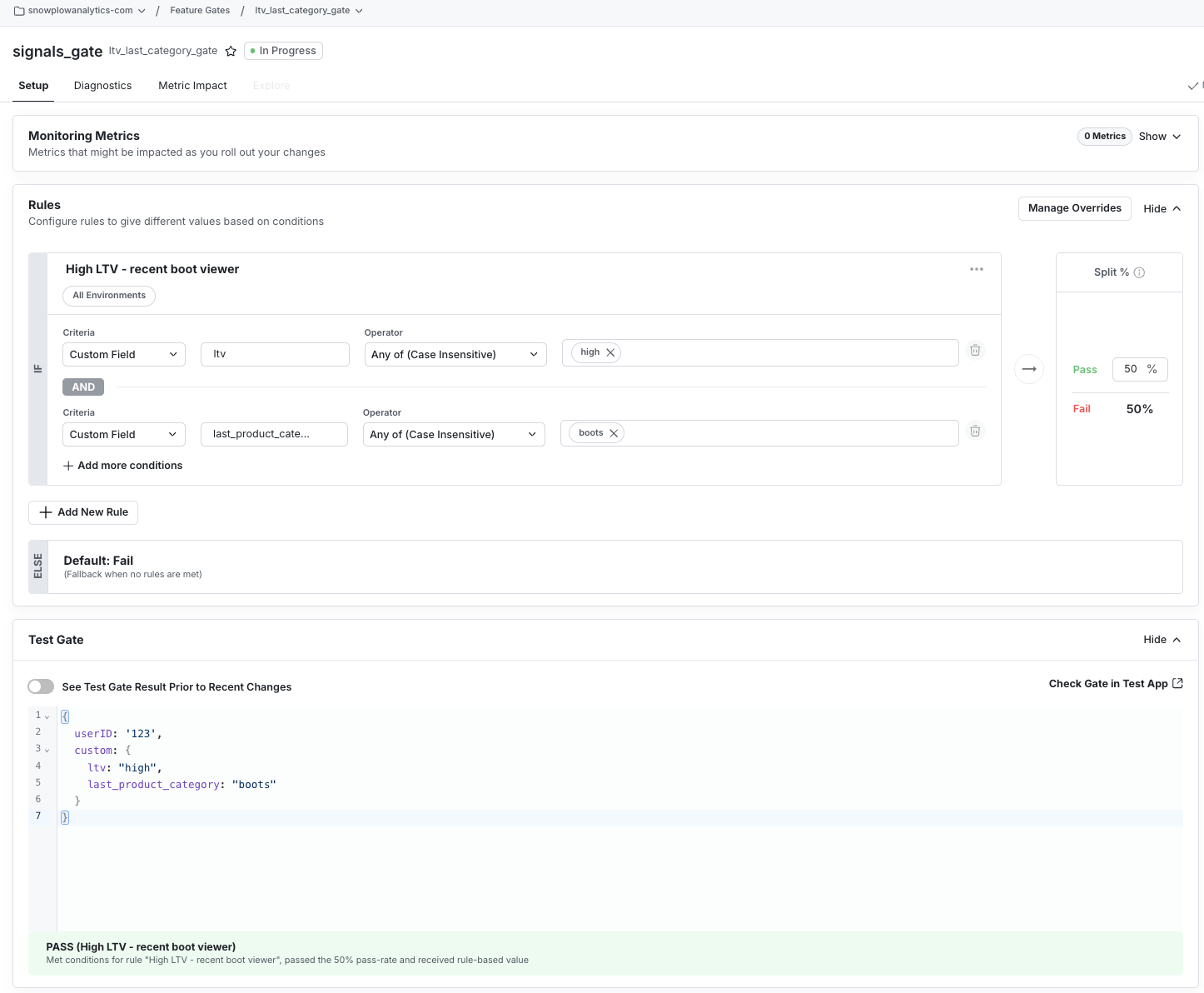
Step 3: read experiment parameters
Once targeting is configured, your code reads the experiment parameters as normal. Statsig handles the targeting evaluation internally, and a user who doesn't match the criteria isn't bucketed into the experiment.
// Statsig evaluates targeting against the custom attributes automatically
const experiment = client.getExperiment('high_ltv_boots_cta');
const ctaText = experiment.get('cta_text', 'Buy');
// ...Render the experience based on the variant with the new ctaText
The Signals attributes you passed in the custom field are evaluated against the experiment's targeting rules before the user is assigned to a variant. If ltv_band isn't "high" or last_product_category isn't "boots", the user never enters the experiment, and getExperiment returns default values.
Best practice: pass as many Signals attributes as available
There's an important distinction when deciding which Signals attributes to include in the StatsigUser object.
All attributes you pass become available for post-hoc analysis in the Results tab of the experiment. You can also use Statsig's Pulse, a more sophisticated visualization tool for drilling into your experiment results.
For example, suppose you're running an experiment targeted at ltv_band = "high" users. If you also pass last_add_to_cart_variant and count_offer_listing_clicks, you can later ask:
- Did the winning variant perform equally well for users who had offer listing clicks, and in what range?
- Was the effect stronger for users with last add to cart variant
"Leather"?
Pass all relevant Signals attributes, not only the ones you're targeting on. The analytical depth is there once the Service call is in place.
Why real-time matters for behavioral segmentation
Most behavioral segmentation today is built on yesterday's data. By the time the warehouse table refreshes and a daily sync lands in the experimentation platform, the behavior you're segmenting on is hours or days old. That is tolerable for some marketing campaigns, but it falls over for experiments where intent matters: cart abandonment, in-session offers, post-search nudges.
Snowplow Signals serves real-time computed attributes from the same behavioral data your analytics already trusts. The user who started a checkout 90 seconds ago is in the right segment now, not tomorrow morning. That difference is what makes behavioral segmentation actually move conversion rates, rather than just look good in a deck.
Summary
Snowplow Signals delivers real-time customer context to your applications: it computes per-user attributes from your behavioral data and serves them through an API at decision time. Statsig handles targeting rules, experiment bucketing, and results analysis. Connecting the two requires no custom infrastructure — pass Signals attributes in the StatsigUser.custom field, define targeting rules in the Statsig console, and read experiment parameters in your code.
Because Statsig has no pre-registration step for attributes, any key-value pair you include in the custom field is immediately available for targeting and analysis. Add the Signals Service call, populate the custom field, and your team can start running behavioral segmentation in experiments without standing up new infrastructure first.