
Agent self-tracking on a platform you don't control
Introducing agent self-tracking proposed three layers of tracking for agentic apps and a pattern called agent self-tracking, where the agent instruments its own reasoning through tools it's instructed to call. The accompanying tutorial implemented all three layers on a Next.js app built with the Vercel AI SDK. That tutorial had one convenient property: we wrote the agent. Every tool was a TypeScript function with a Snowplow tracker call inside it.
This post is about running the same three layers where that isn't true. The platform is Google's CX Agent Studio, part of Gemini Enterprise for CX. The agent runtime belongs to Google, the tools are HTTP endpoints described by OpenAPI schemas, and the only place to put a protocol is the prompt. It's the analytics half of a reference integration we have open-sourced. The other half, where the same agent reads the shopper's session from Snowplow Signals before it replies, is in the companion post. The build itself, with its code and a recording of it running, is on its reference architecture page.
The storefront is Atelier Signals, a fictional luxury fashion house with a concierge agent. During one conversation turn the agent logs what it thought the shopper wanted, why it chose the catalog filters it chose, and whether anything the shopper asked for couldn't be satisfied. Those events land in the same BigQuery table as the product views, and the shopper never sees any of it.
Because each turn's reasoning sits beside what the shopper did next, you can read why confidence was low or a recommendation went unclicked, and change the agent's instructions and tools based on that evidence.
Self-tracking when the tools are HTTP endpoints
In the tutorial, a self-tracking tool was a function with a tracker inside it. Here the agent can only make HTTP calls, so the three self-tracking tools are an OpenAPI toolset, selfTracking, with one operation each: trackUserIntent, trackAgentDecision and trackConstraintViolation.
The storefront endpoints behind them validate the body, attach the identity from the request headers, and emit the corresponding event from the com.snowplow.agent.tracking vocabulary on Iglu Central, Snowplow's public schema registry: user_intent_detected, agent_decision_logged and constraint_violation. Each event carries the agent_context and tool_context entities from that vocabulary and the storefront's own conversation entity. Each tool returns an ID and nothing else, and the reply never depends on it.
Those Iglu Central schemas leave fields like intent_category and decision_type as free-form strings. The storefront applies its own vocabulary on top and rejects a value outside it, so the schemas stay general and the app stays strict. The same lists are repeated in the OpenAPI schema, so the model sees the allowed values too.
The protocol lives in the prompt
The rules that decide when the agent calls those tools live in its instructions, and they're more specific than I expected they would need to be:
- Log the intent once per turn, immediately after the context lookup, with a category, a confidence and a short reason.
- Log the decision in the same step as the
searchCatalogcall it explains, with reasoning that covers the filters chosen and how the results will be presented. - Log a constraint violation whenever the shopper asked for something the catalog can't satisfy, with what they asked for, why it wasn't met, and what was recommended instead.
Throughout the turn, the agent never calls a tracking tool twice for the same purpose, never mentions tracking to the shopper, and never lets it delay the reply.
The second rule exists because of something we saw on the live agent. The app runs tools in parallel mode, and when the instructions said to log the decision "then" show the product carousel, Gemini issued the tracking call and the widget as parallel function calls in a single step. A step made only of function calls carries no text, so every recommendation arrived as cards with no message. Moving the decision call into the searchCatalog step fixed it.
On any managed platform, the self-tracking protocol is part of the prompt. Published agent versions in CX Agent Studio are immutable snapshots, so every change to it is a new version and a deployment repoint. That's the same discipline as code, and it needs the same testing: in the simulator and against the real widget. The repo keeps a Playwright check for exactly this regression.
Making the agent's events joinable
An agent event is only useful beside the conversation it belongs to and the session around it, so three IDs have to reach the storefront's tool endpoints on every call: the shopper's session ID, their user ID, and an ID for the current turn.
The chat widget can't set headers on the agent's tool calls, but it can put variables on the agent session through setQueryParameters, and the OpenAPI schemas bind those variables to headers with the x-ces-session-context extension. The platform injects x-snowplow-session-id, x-snowplow-user-id and x-snowplow-turn-id into every tool request at call time, and the model never sees them. The companion post covers the session and user IDs, which are what the context lookup needs. The turn ID is what the analytics need.
The widget generates one turn ID per message, and the server copies it into both the conversation entity's turn_id and the agent_context entity's invocation_id, the same field the self-tracking tutorial used. Every tool call and every self-tracking event the agent makes while answering one message shares it, and so do the browser's message_sent and message_received events for that message.
Two details cost us real time and are worth knowing before you build the same thing. setQueryParameters replaces the whole variable set rather than merging into it, so the session ID, user ID and turn ID have to be sent together on every call. And the widget's send event fires after the request has already gone, so a turn ID set in the send handler rides on the following turn's request. The repo arms each turn's ID ahead of time, once at mount and again immediately after every send.
One turn, three layers
The sequence below is one turn: the shopper has browsed a few products and asks the concierge for something to finish an evening look.
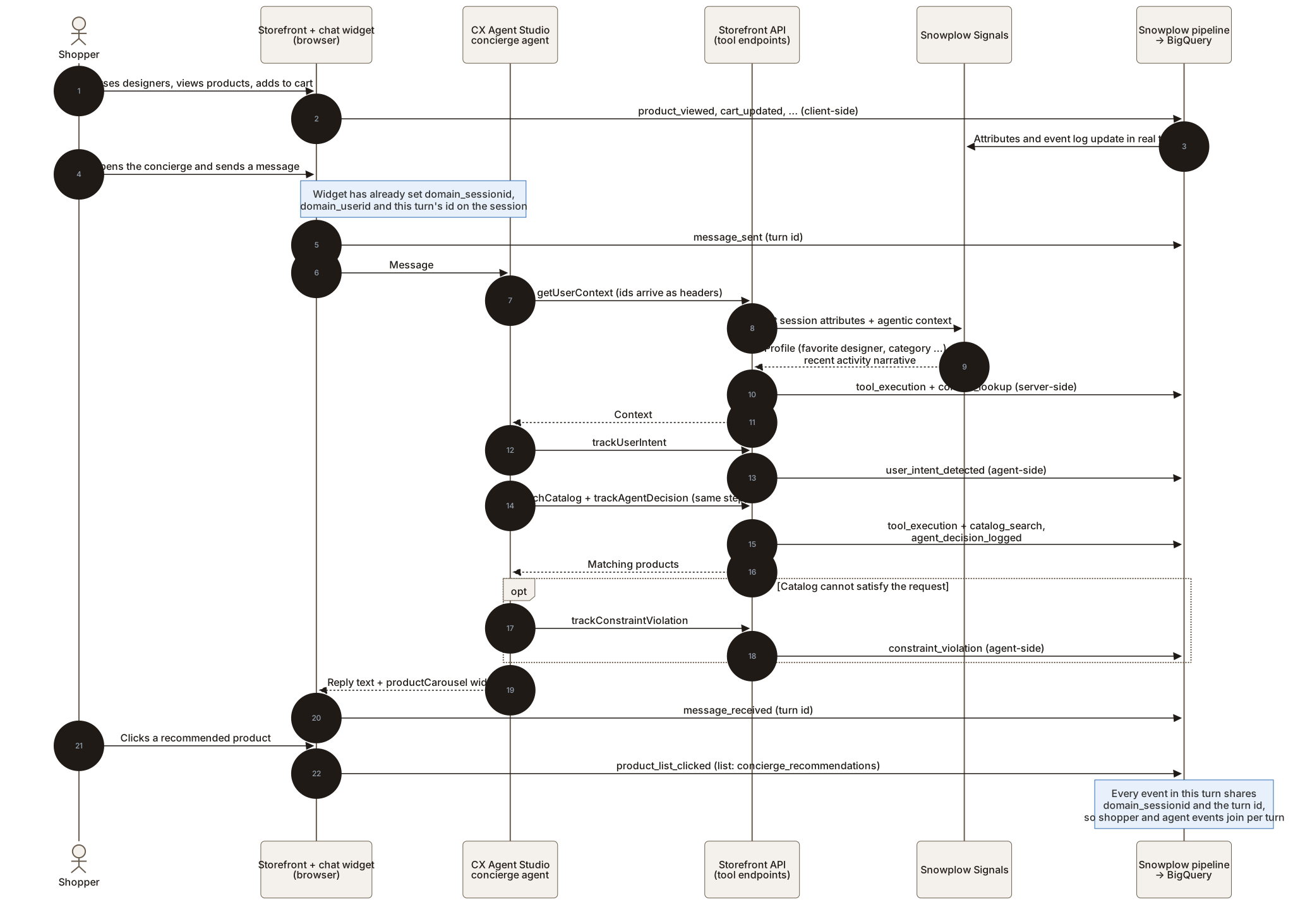
Mapped onto the three layers from the previous post:
Every row shares domain_sessionid. The agent rows also share the turn ID, and the clicks on recommended cards carry a list ID of concierge_recommendations, which is what lets you follow a recommendation out of the chat and into the rest of the session.
What the data answers
The repo ships two SQL files for BigQuery. The agent file is organized around the questions from the previous post. Only the recommendation funnel needs all three layers joined.
Context coverage
The context_lookup entity records whether a profile and a narrative came back, how many attributes and events they held, a reason when the lookup was degraded, and the Signals round trip in milliseconds. A rise in degraded lookups is the first thing to check if the concierge starts sounding generic.
Intent and confidence
user_intent_detected gives the intent distribution with the agent's own confidence. The decision reasoning is there too, and one query passes it to BigQuery's AI.GENERATE function to group it into themes without exporting anything.
Unmet requests
constraint_violation records the requirement the shopper stated, why it couldn't be met and what the agent offered instead. Grouped by constraint type and normalized requirement, that's a merchandising backlog that page-view data can't show, because the shopper stated it in plain language.
Recommendation funnel
The catalog_search entity lists the product IDs each search returned, and the browser's product_list_clicked events record which cards were clicked. The funnel query follows each recommended product from recommended to clicked to viewed to added to cart, and on to a completed checkout in the same session, requiring every step to happen after the recommendation.
Model drift
The agent_context entity carries model_name on every agent event, so the protocol queries can be split by model and by app ID. The same split shows whether each configuration still follows the protocol of one intent per turn.
Low-confidence intents point at instructions to sharpen, unclicked recommendations point at the decision reasoning behind them, and repeated constraint violations point at the catalog rather than the agent.
Running it yourself
None of the self-tracking pattern depends on Google. Any agent platform that supports OpenAPI tools and session-scoped variables injected into requests can run it, and the storefront side doesn't know which platform is calling. It's a reference integration for demos and evaluation: it runs on demo data, with a deliberately simple shared-secret auth model on the tool endpoints, and isn't hardened for production traffic.
The build is on its reference architecture page, and the code and both setup guides are at github.com/snowplow-industry-solutions/signals-google-cx-agent-studio. To see what Signals computes from your own events, start free. The free tier needs no card and runs on your own events.